第二部|能力邊界 · 第 3 章
Tool 是 Agent 的手
設計小而深的 Tool 介面、runtime validation、錯誤語意與可安全擴充的 plugin bundle。
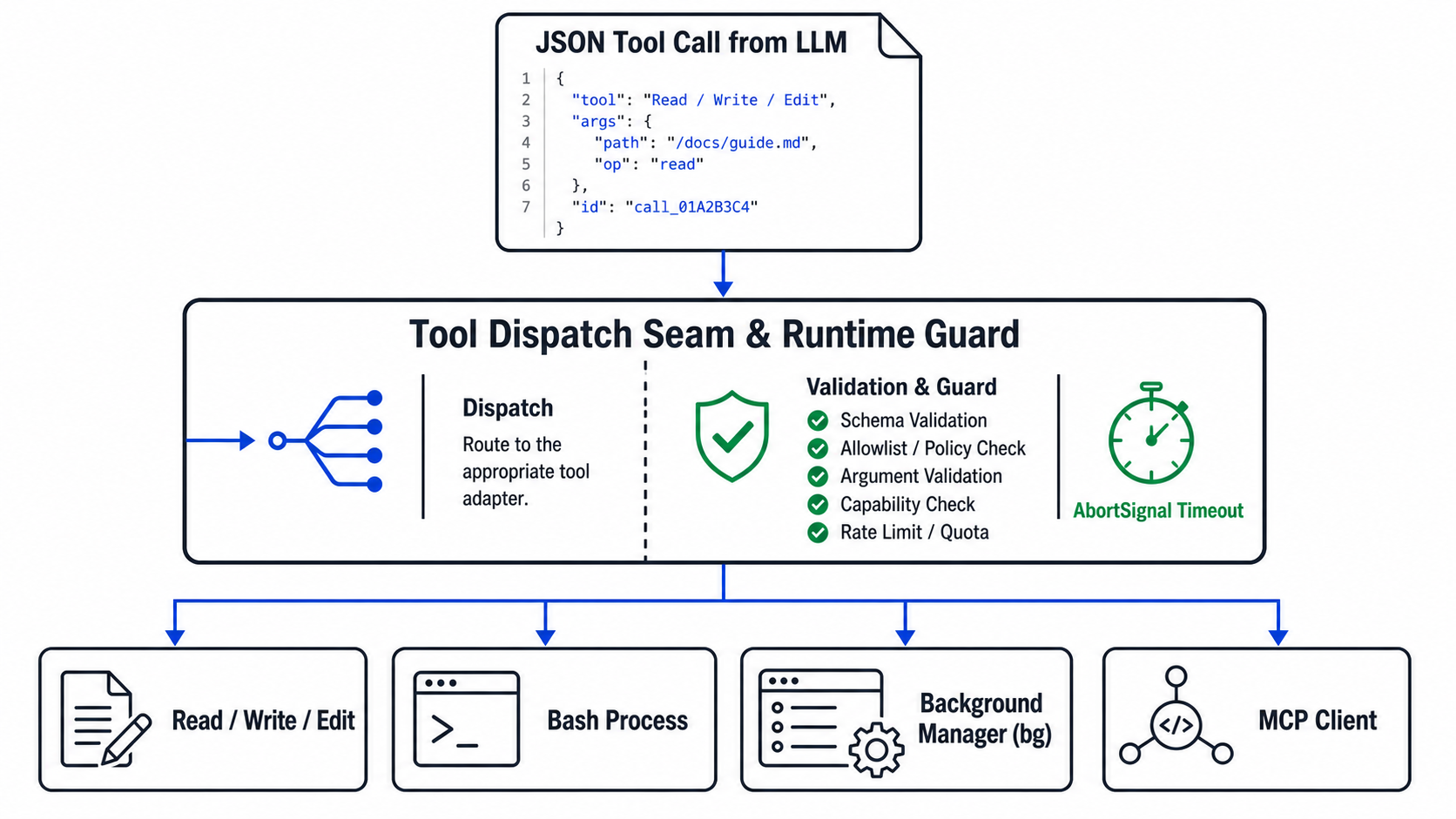
一句話掌握本章核心:LLM 只能「提議行動(Propose Action)」,只有 Tool 才能對真實作業系統產生「副作用(Side Effects)」。Tool 介面是 Agent 的能力端點、測試表面,更是關鍵的安全防線。
小而深的 Tool 介面設計
在 TypeScript reference implementation 中,核心 Runtime 不需要知道某個 Tool 背後是本機讀檔、查詢資料庫還是遠端 MCP。它只依賴一個極小且深(Deep Interface)的契約:
export type Tool = {
    name: string;                                                // 工具唯一名稱(供模型識別)
    description: string;                                         // 語意描述(引導模型何時呼叫)
    parameters: Record<string, unknown>;                         // JSON Schema 格式參數規範
    replay?: "safe" | "never";                                   // 崩潰復原重放策略
    replayKey?: string;                                          // 復原時比對的實作版本金鑰
    definitionIdentity?: string;                                 // 遠端 adapter 定義身分
    execute(args: ToolArgs, signal?: AbortSignal): Promise<string>; // 具體執行函式
};
高內聚原則:Schema 與 Execute 必須合一
TypeScript reference 的取捨:將 JSON Schema、replay 宣告與 execute 放在同一物件,可降低定義與實作漂移。Go、Python、Rust 的教學版為保持直接,仍有集中 definitions 與 dispatcher。若採此形式,就必須以 contract tests 持續核對 schema、派發與 runtime guard,而不能假設兩者自然同步。
// 推薦做法:將定義、守衛與實作高內聚封裝
const readTool: Tool = Object.freeze({
    name: "read",
    replay: "safe",
    replayKey: "builtin:read:v1",
    description: "Read a UTF-8 text file with paging and size bounds.",
    parameters: {
        type: "object",
        properties: {
            path: { type: "string", description: "Path to the file" },
            offset: { type: "integer", minimum: 1 },
            limit: { type: "integer", minimum: 1 },
        },
        required: ["path"],
    },
    execute: trustedReadExecute,
});JSON Schema 不等於 Runtime Validation
TL;DR:JSON Schema 是「給模型看的說明書」,而不是「程式碼守衛」。模型產生的 JSON 參數永遠是不受信任的外部輸入。
| 模型可能回傳的畸形參數 | 常見破壞後果 | Host Runtime Guard 正確防線 |
|---|---|---|
null 或 [](非物件) | 解構時拋出 TypeError: Cannot read property | 進入派發前強制校驗 typeof args === "object" && args !== null |
型別錯亂(如 {"command": 42}) | 底層 OS 指令執行函式型別崩潰 | 在 Tool 內部進行精確型別 Assertion |
| 以成功回傳值承載失敗文字 | 若監控只看 Promise 是否 reject,可能把失敗記成成功 | 先定義清楚 adapter 契約。多數 builtin 參數/I/O 錯誤會 throw。但目前 bash 的 non-zero exit、timeout 與輸出上限會回傳文字,因此其 tool.completed.ok 只代表 adapter 已正常 settle,不等同 shell command exit 0 |
三種邊界不可混為一談:provider 的 strict function calling(若啟用)約束模型產生的 arguments。tiny-agent builtin tools 另做逐欄 runtime guard。MCP adapter 目前只在 Host 端確認 arguments 是 object 並限制 schema 大小/深度,實際欄位驗證仍由遠端 MCP server 依其 inputSchema 負責。即使 provider 支援 strict mode,Host 與 Tool 邊界仍應把輸入視為不可信。
背景行程管理:為什麼需要 bg 工具?
在開發環境中,工程師經常需要啟動持久運行的後端服務(如 npm run dev、Python Flask、Go API)。
| 比較項目 | 標準 bash 工具 | 背景行程 bg 工具 |
|---|---|---|
| 執行語意 | 同步等待命令結束,收集並回傳 stdout/stderr | 非同步啟動行程,短暫確認存活後立即回傳 PID |
| 持久伺服器適用性 | 會等待命令結束,預設 120 秒 timeout,不適合直接承載長期服務 | 適合在目前支援的 POSIX 環境啟動 Dev Server、Watcher。實作依賴 ps、process group 與 Unix signals |
| 生命週期控制 | 回傳當次 stdout/stderr。被截斷時另存完整輸出檔 | 支援 list、status、logs、stop。stop 先送 SIGTERM,等待後仍存活才送 SIGKILL |
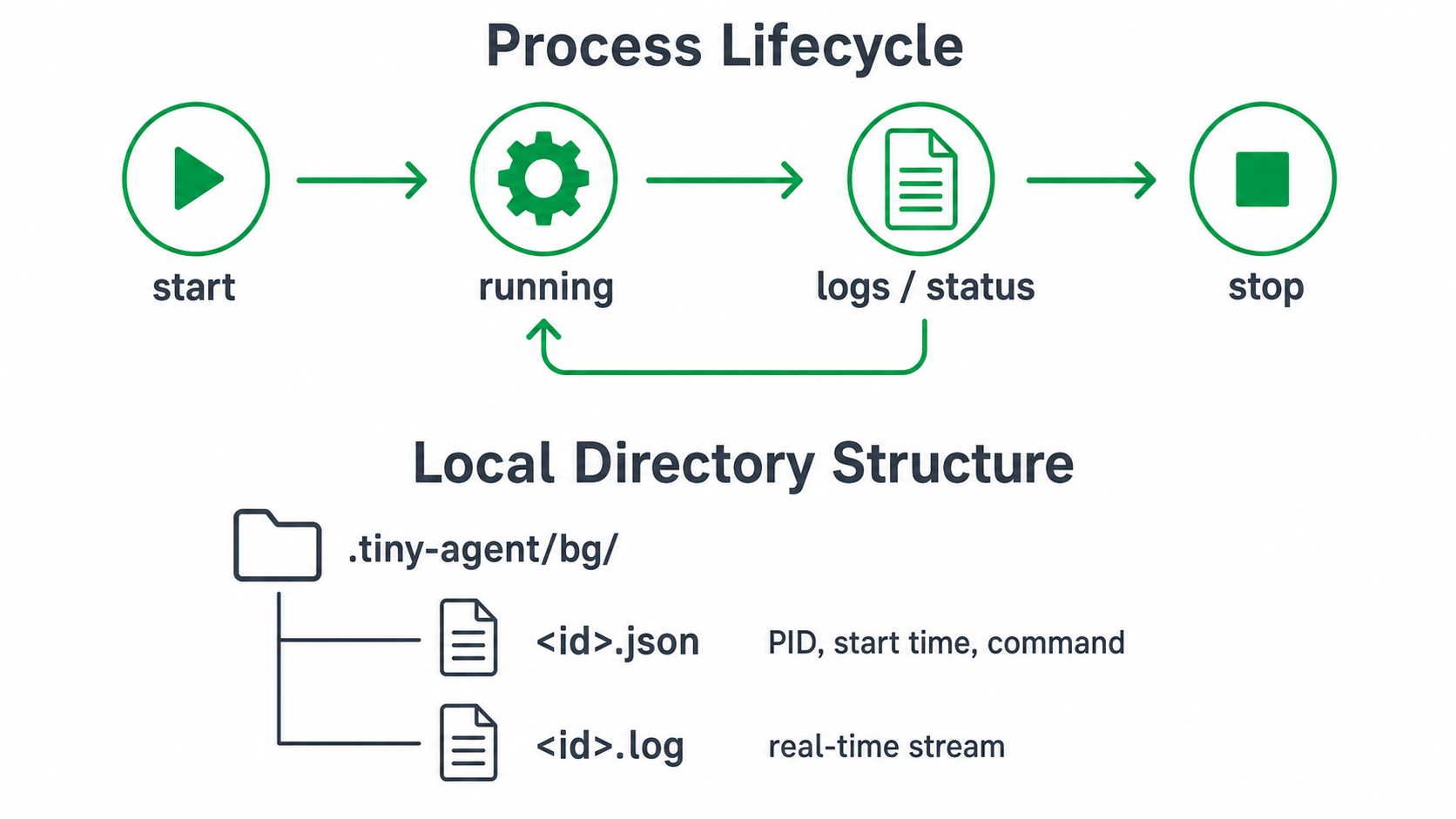
// bg 工具支援的標準操作契約
{"action":"start","command":"node backend/server.mjs"} // 啟動並取得 ID
{"action":"list"}                                      // 列出目前活躍行程
{"action":"logs","id":"12345","tail":50}               // 抓取最後 50 行日誌
{"action":"stop","id":"12345"} // 安全發送 SIGTERM 關閉MCP (Model Context Protocol) 的本質
重要觀念:MCP 在 tiny-agent 架構中只是另一個 Tool Adapter,而不是第二個 Agent Loop。
MCP tools/list ──(規格映射)──→ tiny-agent Tool[]
Tool.execute() ──(遠端呼叫)──→ MCP tools/call (Streamable HTTP)- 信任目錄:Catalog 只由本機設定檔注入,URL、API Token、租戶資訊絕不允許從模型參數中動態載入。
- 命名空間隔離:遠端 Tool 名稱在內部進行編碼防止名稱衝突,僅在 TUI 顯示為
mcp:server/tool_name。
Replay Policy:副作用與復原語意
當系統崩潰重啟時,哪些 Tool 可以安全地「重新執行(Replay)」?
| Replay 宣告 | 適用工具 | 背後理論與原因 |
|---|---|---|
safe | 內建 read 工具(精確版本 builtin:read:v1) | 專案策略允許在 implementation identity、replay key 與 environment identity 相符時重跑。它不會寫入目標檔,但檔案可能在兩次讀取間改變,因此不應稱為輸出固定的 pure function。 |
never | write, edit, bash, bg, MCP | 具備外部副作用。崩潰當下無法保證磁碟寫入或網路請求是否已發生,嚴禁盲目重放,避免重複發送請求或破壞原始碼。 |
動手驗證 (Hands-on Lab)
執行離線測試,觀察 TypeScript 的 Tool 注入、參數守衛、cwd 外/symlink 行為,以及 Go 的對應檔案工具 contract:
# 1. 驗證 TypeScript 的 Tool 注入與路徑穿透特性
cd typescript
node --import tsx --test --test-name-pattern="injected tool|validates tool argument objects|paths outside cwd" tests/index.test.ts

# 2. 驗證 Go 版本的同等檔案工具行為
cd ../go
go test ./cmd/tiny-go -run 'TestFilesystemToolsOperateOutsideCwdIncludingSymlinks' -count=1
Tool 確立了 Agent 改變世界的能力邊界。但若每次推論都將所有 Tool 定義與龐大專案規則全數塞進模型,會迅速撐爆 Context Window。下一章我們將探討 Context Engineering 與 Skills 的漸進式載入(Progressive Loading)。